Empowering the younger Generation

Empowering the younger Generation


Showing posts with label uki-2. Show all posts

Thursday, March 1, 2018

March 01, 2018

React.js

React.js


 1.What is React.js?

  • Developed by Facebook
  • React is a view layer library, not a framework like Backbone, Angular etc.
  • You can't use React to build a fully-functional web app

2.Why was React developed?

  • Complexity of two-way data binding
  • Bad UX from using "cascading updates" of DOM tree
  • A lot of data on a page changing over time
  • Complexity of Facebook's UI architecture
  • Shift from MVC mentality

3.Who uses React?


Why should I use React?

  • Easy to read and understand views
  • Concept of components is the future of web development
  • If your page uses a lot of fast updating data or real time data - React is the way to go
  • Once you and your team is over the React's learning curve, developing your app will become a lot faster


React.js is a JavaScript library. It was developed by engineers at Facebook.
                              

 why people choose to program with React:
        1. React is fast. Apps made in React can handle complex updates    and still feel quick and responsive. 
        2. React is modular. Instead of writing large, dense files of code, you can write many smaller, reusable files. React's modularity can be a beautiful solution to JavaScript's.
        3. React is flexible. You can use React for interesting projects that have nothing to do with making a web app. People are still figuring out React's potential.
       4.React is popular. While this reason has admittedly little to do with React's quality, the truth is that understanding React will make you more employable.  
 
                    --how to work React-- 
                        
                         React worked in browser


 You go and easy to study react.js here:https://reactjs.org/

                    I WILL MEET YOU IN NEXT MY BLOG....... 


Monday, February 26, 2018

February 26, 2018

ER Diagram

ER Diagram 

What is an ER diagram?

The ER model defines the conceptual view of a database. It works around real-world entities and the associations among them. At view level, the ER model is considered a good option for designing databases.

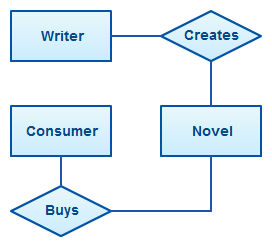
An Entity Relationship Diagram (ERD) is a visual representation of different entities within a system and how they relate to each other. For example, the elements writer, novel, and a consumer may be described using ER diagrams the following way


ER Diagram Symbols and Notations


ER Diagrams Usage

What are the uses of ER diagrams? Where are they used? Although they can be used to model almost any system they are primarily used in the following areas.

ER Models in Database Design

They are widely used to design relational databases. The entities in the ER schema become tables, attributes and converted the database schema. Since they can be used to visualize database tables and their relationships it’s commonly used for database troubleshooting as well.


ER diagrams in software engineering 

Entity relationship diagrams are used in software engineering during the planning stages of the software project. They help to identify different system elements and their relationships with each other. It is often used as the basis for data flow diagrams or DFD’s as they are commonly known. 

For example, an inventory software used in a retail shop will have a database that monitors elements such as purchases, item, item type, item source and item price. Rendering this information through an ER diagram would be something like this:


Entity

Entities are represented by means of rectangles. Rectangles are named with the entity set they represent.

Weak Entity

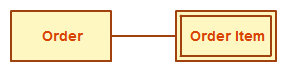
A weak entity is an entity that depends on the existence of another entity. In more technical terms it can be defined as an entity that cannot be identified by its own attributes. It uses a foreign key combined with its attributed to form the primary key. An entity like order item is a good example for this. The order item will be meaningless without an order so it depends on the existence of the order.

Attribute

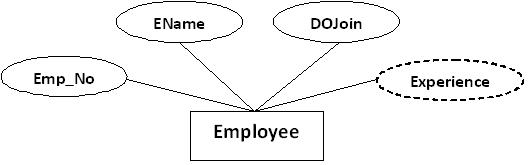
Attributes are the properties of entities. Attributes are represented by means of ellipses. Every ellipse represents one attribute and is directly connected to its entity (rectangle).


Derived Attribute

An attribute based on another attribute. This is found rarely in ER diagrams. For example, for a circle, the area can be derived from the radius.


composite Attribute

If the attributes are composite, they are further divided in a tree like structure. Every node is then connected to its attribute. That is, composite attributes are represented by ellipses that are connected with an ellipse.


Multivalued Attribute

If an attribute can have more than one value it is called a multi valued attribute. It is important to note that this is different to an attribute having its own attributes. For example, a teacher entity can have multiple subject values.

Relationship

Relationships are represented by diamond-shaped box. Name of the relationship is written inside the diamond-box. All the entities (rectangles) participating in a relationship, are connected to it by a line.

Recursive Relationship

If the same entity participates more than once in a relationship it is known as a recursive relationship. In the below example an employee can be a supervisor and be supervised, so there is a recursive relationship

Cardinality and Ordinality

These two further defines relationships between entities by placing the relationship in the context of numbers.


Relationship

Relationships are represented by diamond-shaped box. Name of the relationship is written inside the diamond-box. All the entities (rectangles) participating in a relationship, are connected to it by a line.

Binary Relationship and Cardinality

A relationship where two entities are participating is called a binary relationship. Cardinality is the number of instance of an entity from a relation that can be associated with the relation.
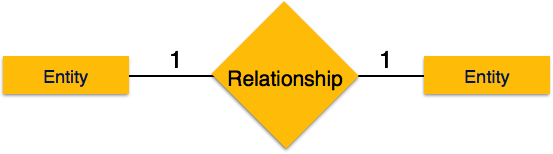
  • One-to-one − When only one instance of an entity is associated with the relationship, it is marked as '1:1'. The following image reflects that only one instance of each entity should be associated with the relationship. It depicts one-to-one relationship.
  • One-to-one
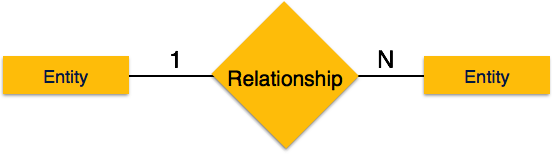
  • One-to-many − When more than one instance of an entity is associated with a relationship, it is marked as '1:N'. The following image reflects that only one instance of entity on the left and more than one instance of an entity on the right can be associated with the relationship. It depicts one-to-many relationship.
  • One-to-many
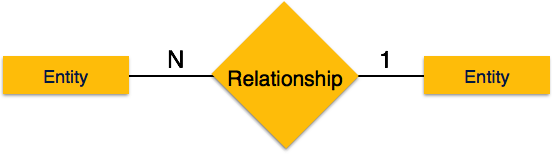
  • Many-to-one − When more than one instance of entity is associated with the relationship, it is marked as 'N:1'. The following image reflects that more than one instance of an entity on the left and only one instance of an entity on the right can be associated with the relationship. It depicts many-to-one relationship.
  • Many-to-one
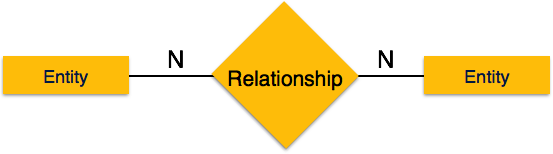
  • Many-to-many − The following image reflects that more than one instance of an entity on the left and more than one instance of an entity on the right can be associated with the relationship. It depicts many-to-many relationship.
  • Many-to-many

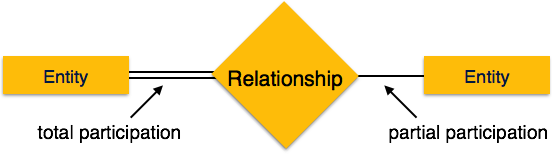
Participation Constraints

Total Participation − Each entity is involved in the relationship. Total participation is represented by double lines. 
  • Partial participation − Not all entities are involved in the relationship. Partial participation is represented by single lines.

Participation Constraints

Tuesday, February 20, 2018

February 20, 2018

Express


Express

ExpressJS is a web application framework that provides you with a simple API to build
websites, web apps and back ends. With ExpressJS, you need not worry about low level
protocols, processes, etc.


1.What is Express?

Express provides a minimal interface to build our applications. It provides us the tools that
are required to build our app. It is flexible as there are numerous modules available
on npm, which can be directly plugged into Express.
Express was developed by TJ Holowaychuk and is maintained by the Node.js foundation
and numerous open source contributors.
Why Express?
Unlike its competitors like Rails and Django, which have an opinionated way of building
applications, Express has no "best way" to do something. It is very flexible and pluggable.
Pug
Pug (earlier known as Jade) is a terse language for writing HTML templates. It -
  • Produces HTML
  • Supports dynamic code
  • Supports reusability (DRY)
It is one of the most popular template language used with Express.


MongoDB and Mongoose
 
MongoDB is an open-source, document database designed for ease of development and
scaling. This database is also used to store data.
Mongoose is a client API for node.js which makes it easy to access our database from our
Express application.

Express install

    node --version

    npm --version

    npm install -g <package-name>

➞Step 1: Start your terminal/cmd, create a new folder named hello-world and cd (create
directory) into it:

➟step 2
npm init

➞step 3
npm install --save express

ls node_modules #(dir node_modules for windows)

npm install -g nodemon

This is all we need to start development using the Express framework. To make our
development process a lot easier, we will install a tool from npm, nodemon. This tool
restarts our server as soon as we make a change in any of our files, otherwise we need to
restart the server manually after each file modification.

We have set up the development, now it is time to start developing our first app using
Express. Create a new file called index.js and type the following in it.

var express = require('express');
var app = express();
app.get('/', function(req, res){
res.send("Hello world!");
});
app.listen(3000);

Save the file, go to your terminal and type the following.

nodemon index.js

This will start the server. To test this app,

ExpressJS – Routing

app.method(path, handler)

This METHOD can be applied to any one of the HTTP verbs – get, set, put, delete. An
alternate method also exists, which executes independent of the request type.
Path is the route at which the request will run.

ExpressJS – HTTP Methods

➞GET ⇒The GET method requests a representation of the specified resource. Requests
using GET should only retrieve data and should have no other effect.

➞POST ⇒The POST method requests that the server accept the data enclosed in the
request as a new object/entity of the resource identified by

➞PUT ⇒The PUT method requests that the server accept the data enclosed in the
request as a modification to existing object identified by the URI. If it does not
exist then the PUT method should create one.

➞DELETE ⇒The DELETE method requests that the server delete the specified resource.


Thank you
i will meet you in my next blog
February 20, 2018

POSTMAN

   POSTMAN 

1.What is Postman app?
* A Little About Postman. Postman is a Google Chrome app for interacting with HTTP APIs. It presents you with a friendly GUI for constructing requests and reading responses.

2.What is Postman API?
* Postman is a powerful HTTP client for testing web services. Created by Abhinav Asthana, a programmer and designer based in Bangalore, India, Postman makes it easy to test, develop and document APIs by allowing users to quickly put 
 together both simple and complex HTTP requests.

 3.What is API in software testing?
* API TESTING is a type of software testing that involves testing application programming interfaces (APIs) directly and as part of integration testing to determine if they meet expectations for functionality, reliability, performance, and security. Since APIs lack a GUI, API testing is performed at the message layer.

4. What is REST API testing?

* Rest stands for Representational State Transfer. It is an architectural style and an approach for communication used in the development of Web Services. REST has become a logical choice for building APIs. It enables users to connect and interact with cloud services efficiently.


5.WHAT IS THE REST API?
* What is REST? REST stands for Representational State Transfer. (It is sometimes spelled "ReST".) It relies on a stateless, client-server, cacheable communications protocol -- and in virtually all cases, the HTTP protocol is used. REST is an architecture style for designing networked applications.


Postman Interface Here 

Thank you
i will meet you in my next blog
February 20, 2018

API

Restful API


1.What is the API?
  • Application program interface (API) is a set of routines, protocols, and tools for building software applications. An API specifies how software components should interact. Additionally, APIs are used when programming graphical user interface (GUI) components.


2.What is the Rest API? 
  • REST stands for Representational State Transfer. (It is sometimes spelled "ReST".) It relies on a stateless, client-server, cacheable communications protocol -- and in virtually all cases, the HTTP protocol is used. REST is an architecture style for designing networked applications.


3.What is the use of Web API?
  •    ASP.NET Web API. ASP.NET Web API is a framework that makes it easy to build HTTP services that reach a broad range of clients, including browsers and mobile devices. ASP.NET Web API is an ideal platform for building RESTful applications on the .NET Framework.
 
4.What is ReST services?
  • RESTful Web Services: A Tutorial. ... While REST stands for Representational State Transfer, which is an architectural style for networked hypermedia applications, it is primarily used to build Web services that are lightweight, maintainable, and scalable. A service based on REST is called a RESTful service.
  5. What is the rest protocol?
  • Simple Object Access Protocol (SOAP) and Representational State Transfer (REST) are two answers to the same question: how to access Web services.
  6.What is a Web service?  
  • A web service is any piece of software that makes itself available over the internet and uses a standardized XML messaging system. XML is used to encode all communications to a web service. For example, a client invokes a web service by sending an XML message, then waits for a corresponding XML response. 
  7.what a RESTFUL Api?
  •  Separate the client from the server.
  • not hold state between request.
  • use http and http methods.
                console.log(xhr.status)
                console.log(xhr.statusTest) 


 8.what the four verbs?
  • GET
  • POST
  • PUT
  • DELETE 

9.Anatomy of request ?

  • The Request  line
  • The Header
  • The Body

Getting started

For the purpose of this tutorial, I’ll work you through creating a RESTful API. To achieve this, we will create a RESTful todo list API (i.e. endpoints that will create a task, get or read list of all tasks, read a particular task, delete a task, and update a task).

Assumptions

I presume that you already have your environment set up (i.e Node.js and MongoDB is installed).

Kindly run npm -v and mongo --version as these will show you the version of NPM and MongoDB installed on your machine.

If you don’t have it installed, kindly go through this link on how to install it in order for us to create a server in Node and Mongodb.

If you do have Node and MongoDB installed, let's begin the tutorial with the following basic steps.


Open your terminal and kindly follow the following steps


  Create a Folder name todoListApi - mkdir todoListApi

  Navigate to the root of your newly created folder - cd todoListApi

  Create a package.json file - npm init
Package.json is a file that gives the necessary information to npm which allows it to identify the project as well as handle the project's dependencies.


npm init will prompt you to enter some information such as the app name, description, version, author, keyword and also ask if what you see is what you like.


You should have something like this eventually.  

enter image description here


 Kindly type yes and press enter to complete the creation of our package.json. Having done all these, your folder structure should look like this:


enter image description here 

 Create a file called server.js - touch server.js.
In this server, we will writing the protocols to create our server.


Create a folder called api - mkdir api
Inside this folder called api, create three separate folders called models, routes, and controllers by running mkdir api/controllers api/models api/routes


enter image description here 

 
 Create todoListController.js in the api/controller folder, todoListRoutes.js in the routes folder, and todoListModel in the model folder - touch api/controllers/todoListController.js api/models/todoListModel.js api/routes/todoListRoutes.js

 Our folder structure should look like this now:

enter image description here 


Server setup

Let's install express and nodmon, express will be used to create the server while nodmon will help us to keep track of changes to our application by watching changed files and automatically restart the server.

 ➞npm install --save-dev nodemon


➞npm install express --save

 On successful installation, your package.json file will be modified to have the two newly installed packages.


 Open the package.json file and add this task to the scrip 

enter image description here

 Open the server.js file and type/copy the code below into it
 var express = require('express'),  app = express(),  port = process.env.PORT || 3000;
app.listen(port);console.log('todo list RESTful API server started on: ' + port);

enter image description here


Setting up the schema

  • First of all, let’s install mongoose - npm install mongoose --save


Why Mongoose?

Mongoose is what we will use to interact with a MongoDB(Database) instance.

After installation, open the todoListModel.js file in your api/models folder and type the following code into the file and save.


'use strict';
var mongoose = require('mongoose');
var Schema = mongoose.Schema;


var TaskSchema = new Schema({
  name: {
    type: String,
    Required: 'Kindly enter the name of the task'
  },
  Created_date: {
    type: Date,
    default: Date.now
  },
  status: {
    type: [{
      type: String,
      enum: ['pending', 'ongoing', 'completed']
    }],
    default: ['pending']
  }
});

module.exports = mongoose.model('Tasks', TaskSchema);


 From the code above, we required the mongoose in our file and then, we create a model of how our collection should look like.As you can see, it the task collection(table) will contain a name: a string, and the date it was created. It also contains task status which we have defined as pending - a default value for every task created.

Setting up the routes

Routing refers to determining how an application responds to a client request for a specific endpoint, which is a URI (or path) and a specific HTTP request method (GET, POST, and so on).

Each of our routes has different route handler functions, which are executed when the route is matched.


Below we have defined two basic routes(‘/tasks’, and ‘/tasks/taskId’) with different methods
‘/tasks’ has to methods(‘GET’ and ‘POST’), while ‘/tasks/taskId’ has GET, PUT and DELETE.


As you can see, we required the controller so each of the routes methods can call it’s respective handler function.


module.exports = function(app) {
  var todoList = require('../controllers/todoListController');


  // todoList Routes
  app.route('/tasks')
    .get(todoList.list_all_tasks)
    .post(todoList.create_a_task);


  app.route('/tasks/:taskId')
    .get(todoList.read_a_task)
    .put(todoList.update_a_task)
    .delete(todoList.delete_a_task);
};

Setting up the controller
Open todoListController.js file with your text editor( Sublime, Atom e.t.c) and let’s deep dive into coding.

In this controller, we would be writing five(5) different functions namely: list_all_tasks, create_a_task, read_a_task, update_a_task, delete_a_task. We will exported each of the functions for us to use in our routes.

Each of these functions uses different mongoose methods such as find, findById, findOneAndUpdate, save and remove.

    
             res.send(err);
    res.json(task);
  });
};

exports.delete_a_task = function(req, res) {

  Task.remove({
    _id: req.params.taskId
  }, function(err, task) {
    if (err)
      res.send(err);
    res.json({ message: 'Task successfully deleted' });
  });
}; 

Putting everything together
 Connect our database by adding a url to the mongoose instance connection

  Load the created model - task

Install bodyParser and use
bodyParser Parse incoming request bodies in a middleware before your handlers, available under the req.body property.
It exposes various factories to create middlewares. All middlewares will populate the req.bodyproperty with the parsed body, or an empty object ({}) if there was no body to parse (or an error was returned).

Register our created routes in the server


var express = require('express'),
  app = express(),
  port = process.env.PORT || 3000,
  mongoose = require('mongoose'),
  Task = require('./api/models/todoListModel'),
  bodyParser = require('body-parser');
  
mongoose.Promise = global.Promise;
mongoose.connect('mongodb://localhost/Tododb'); 

app.use(bodyParser.urlencoded({ extended: true }));
app.use(bodyParser.json());

var routes = require('./api/routes/todoListRoutes');
routes(app);

app.listen(port);

console.log('todo list RESTful API server started on: ' + port); 
Start MongoDB Server
  
Open your terminal and run mongod
 This will start your MongoDB server and then, node server could connect to the MongoDB instance. Once your MongoDB server is running, restart your node server by running: rs on your nodemon running terminal. 

⟹Testing via Postman

Now that everything is now connected, let’s test each of the routes and the respective methods.
Open your postman and type:

 http://localhost:3000/tasks in the enter request URL section and press enter.

 Screen Shot 2017-03-03 at 8.15.35 PM.png
 On enter, you should see “[]” because there is nothing in the database yet.


On the same address, change the method to POST, click body and select “x-www-form-urlencoded”.
Then, enter name as the key and the corresponding task name as value.
After this, click on send button.
This should give you a response 200 ok

Screen Shot 2017-03-03 at 8.12.55 PM.png 


Adding a middleware

Having done all these, what happens if we entered a wrong route? say you entered 'http://localhost:3000/task', It responds with a message “Cannot GET /task”. Let’s add express middleware which could be used to return more interactive messages.

Middlewares basically intercepts incoming http request and as such you can use them to perform several operations ranging from authentication to validations etc.
 app.use(function(req, res) {
  res.status(404).send({url: req.originalUrl + ' not found'})});

   
                                    i will meet you next post continue....
February 20, 2018

HackerRank

HackerRank 


HackerRank is a technology company that focuses on competitive programming challenges for both consumers and businesses, where developers compete by trying to program according to provided specifications. HackerRank's programming challenges can be solved in a variety of programming languages (including Java, C++, PHP, Python, SQL) and span multiple computer science domains.
 On the consumer side, when a programmer submits a solution to a programming challenge, their submission is scored on the accuracy of their output and the execution time of their solution. Programmers are then ranked globally on the HackerRank leaderboard and earn badges based on their accomplishments to drive competition among users. In addition to individual programming challenges, HackerRank also hosts contests (often referred to by HackerRank as "CodeSprints") where users compete in the same programming challenges during a set period of time and are then ranked at the conclusion of the event. HackerRank is seenas a market leader in the growing gamification trend within competitive computer programming and the consumer-side of their website is free for coders to use.

Computer science domains on HackerRank

In addition to supporting a variety of popular (and some obscure) programming languages, HackerRank categorizes most of their programming challenges into a number of core computer science domains including:
  • Artificial Intelligence: involves developing AI bots and using them against others.
  • Algorithms: Traditional algorithmic challenges.
  • Functional Programming: use functional programming abstractions to solve challenges.
  • Machine Learning: use predictive modeling and analysis to solve challenges.


 So you create the HackerRank account then you work HackerRank and learn many thins in HackerRank.
 
 Go to this is site:-http://hackyourfuture.net
   

......Thank you.....!
February 20, 2018

Introduction to web development

           Introduction to web development


What is a web page?


A web page is a document commonly written in Hyper Text Markup Language.

A web page is accessed by entering a URL address and may contain text, graphics, and hyperlings to other web pages and files.


What is web browser?


 A web browser is a software program that allows a user to locate, access, and display web pages.


Example for web browsers 


Google Chrome
Mozilla Firefox
Apple Safari
Microsoft Internet Explorer
Microsoft Edge
Opera
Maxthon
Onion
 

What is a web sever?


A Web server is a system that delivers content or services to end users over the Internet.

A Web server consists of a physical server, server operating system (OS) and software used to facilitate HTTP communication.

What is a website?


A website is a collection of Web pages, images, videos or other digital assets that hosted on one or several Web server(s), usually accessible via the Internet, cell phone or a LAN.
 
 
 Front design  -  HTML,CSS 

Client site(user)  -  Java script

Saver site  -  PHP,Node.JS,Ruby,Python

Data base  -  SQL
 
 
....Thank you....

Monday, February 19, 2018

February 19, 2018

Nodejs


Nodejs


1.what is nodejs ? 
 Node.js is a server-side platform built on Google Chrome's JavaScript Engine (V8 Engine). Node.js was developed by Ryan Dahl in 2009 and its latest version is v0.10.36.

 Node.js is an open source, cross-platform runtime environment for developing server-side and networking applications. Node.js applications are written in JavaScript, and can be run within the Node.js runtime on OS X, Microsoft Windows, and Linux. 
2.what Features of Node.js ?
* Asynchronous and Event Driven
* Very Fast
*Single Threaded but Highly Scalable
*No Buffering 
*License 

3.Who Uses Node.js?

* Following is the link on github wiki containing an exhaustive list of projects, application and companies which are using Node.js. This list includes eBay, General Electric, GoDaddy, Microsoft, PayPal, Uber, Wikipins, Yahoo!, and Yammer to name a few.


4.What Concepts are in Node.js?

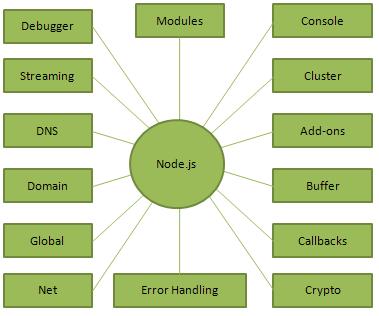
* The following diagram depicts some important parts of Node.js which we will discuss in detail in the subsequent chapters.


5.Where to Use Node.js?
  Following are the areas where Node.js is proving itself as a perfect technology    partner.

I/O bound Applications
Data Streaming Applications
Data Intensive Real-time Applications (DIRT)
JSON APIs based Applications
Single Page Applications

--Node.js  modules--


 1.What is a Module in Node.js?

   * Consider modules to be the same as JavaScript libraries. 
     * A set of functions you want to include in your application.

--Include Modules--

* To include a module, use the require() function with the name of the module:
1.var http = require('http'); 
* Now your application has access to the HTTP module, and is able to create a server:
http.createServer(function (req, res) {
    res.writeHead(200, {'Content-Type': 'text/html'});
    res.end('Hello World!');
}).listen(8080); 


--Create Your Own Modules--

* You can create your own modules, and easily include them in your applications.
* The following example creates a module that returns a date and time object:

exports.myDateTime = function () {
    return Date();
};  

Use the exports keyword to make properties and methods available outside the module file.
Save the code above in a file called "mycreatemodule.js"


var http = require('http');
var dt = require('./mycraetemodule');

             ** Include Your Own Module **

http.createServer(function (req, res) {
    res.writeHead(200, {'Content-Type': 'text/html'});
    res.write("The date and time are currently: " + dt.myDateTime());
    res.end();
}).listen(8080);


I WILL MEET YOU IN MY NEXT BLOG.........

 ---THANK YOU---